UI Components
The Festi Theme offers a variety of reusable UI components for building robust and customizable interfaces.
This page lists the methods of each component. The HUI guide tells you how the components work, how to replace a component template, and how to add a component.
Each component also has these methods: fetch(), setID(), getID(), setCSS(), getCSS(), addDataAttribute(), removeDataAttribute(), setDataAttributes(), getDataAttributes().
- Basic Components
- Guide Block
- Breadcrumbs
- Button
- Buttons
- Link
- Dropdown
- Sparks
- Slider
- Form Components
- Input
- Select
- Checkbox
- Checkboxes
- Textarea
- Filter Panel
- Layout Components
- Block
- Widget
- Dialog
- Card
- Tabs
- Main Navbar
- Display Components
- Message
- Data List
- Filter
Basic Components
Guide Block
A component for displaying informational blocks with icons and descriptions.

Methods:
Sets the icon path for the guide block
public function setIcon(string $icon): IGuideBlock;Sets the title text for the guide block
public function setTitle(string $title): IGuideBlock;Sets the descriptive text for the guide block
public function setDescription(string $description): IGuideBlock;Example:
$this->ui->guideBlock()
    ->setIcon('/path/to/icon.png')
    ->setTitle('Title')
    ->setDescription('Description')
    ->fetch();
Breadcrumbs
Navigation component showing the current page location hierarchy.

Methods:
Sets the navigation items array where keys are labels and values are URLs (false for current page)
public function setItems(array $items): IBreadcrumbs;Sets additional content to be displayed on the right side of the breadcrumbs
public function setRight(string $content): IBreadcrumbs;Example:
$items = [
    'Home' => '/url/to/home',
    'Current Page' => false // false indicates current page
];
$this->ui->breadcrumbs()
    ->setItems($items)
    ->setRight('Additional content')
    ->fetch();
Button
Single button component with customizable attributes.
Methods:
Sets the text displayed on the button
public function setCaption(string $caption): IButton;Sets the URL that the button links to
public function setUrl(string $url): IButton;Sets a unique identifier for the button
public function setId(string $id): IButton;Sets the button type (e.g., 'submit', 'button', 'reset')
public function setType(string $type): IButton;Sets CSS classes for styling the button
public function setCSS(string $css): IButton;Sets the disabled attribute
public function setDisabled(bool $isDisabled = true): IButton;Sets the Font Awesome icon name, without the prefix fa-
public function setIcon(?string $icon): IButton;Sets the JavaScript for the onclick attribute. setUrl() has priority over setClick().
public function setClick(string $js): IButton;Gets the current button type
public function getType(): ?string;Example:
$this->ui->button()
    ->setCaption('Click Me')
    ->setType('submit')
    ->setCSS('btn-primary')
    ->setUrl('/action/url')
    ->setId('uniqueButtonId')
    ->setDisabled()
    ->fetch();
Buttons
Component for grouping multiple buttons together.
Methods:
Sets an array of button components to be displayed as a group
public function setItems(array $items): IButtons;Link
Hyperlink component for creating clickable links with customizable attributes.
Methods:
Sets the URL that the link points to
public function setHref(string $href): ILink;Sets the target attribute for the link (e.g., '_blank', '_self', '_parent', '_top')
public function setTarget(string $target): ILink;Sets the text displayed for the link
public function setCaption(string $caption): ILink;Sets CSS classes for styling the link
public function setCSS(string $css): ILink;Sets a unique identifier for the link
public function setID(int|string $id): ILink;Sets the title attribute for the link
public function setTitle(string $title): ILink;Example:
$this->ui->link()
    ->setHref('/dashboard/users/')
    ->setCaption('View Users')
    ->setTitle('View Users')
    ->setTarget('_blank')
    ->setCSS('btn-default')
    ->setID('users-link')
    ->fetch();
Dropdown
Bootstrap-style dropdown menu component with customizable trigger and menu items.
Methods:
Sets the caption text for the dropdown trigger button
public function setCaption(string $caption): IDropdown;Sets an array of menu items to be displayed in the dropdown
public function setItems(array $items): IDropdown;Sets the alignment of the dropdown menu ('left', 'right')
public function setAlign(string $align): IDropdown;Sets CSS classes for styling the dropdown
public function setCSS(string $css): IDropdown;Sets a unique identifier for the dropdown
public function setID(int|string $id): IDropdown;Example:
$items = [
    $this->ui->link()->setHref('/books/edit/')->setCaption('Edit'),
    $this->ui->link()->setHref('/books/delete/')->setCaption('Delete')->setDataAttributes(['confirm' => 'Are you sure?'])
];

$this->ui->dropdown()
    ->setCaption('Actions')
    ->setItems($items)
    ->setAlign('right')
    ->setCSS('dropdown-menu-end')
    ->setID('actions-dropdown')
    ->setDataAttributes(['toggle' => 'dropdown'])
    ->fetch();
Rendered HTML:
<div class="fui-buttons pull-right dropdown-menu-end" id="actions-dropdown" data-toggle="dropdown">
    <button type="button" class="btn btn-default dropdown-toggle" data-toggle="dropdown">
        Actions
        <span class="caret"></span>
    </button>
    <ul class="dropdown-menu pull-right" role="menu">
        <li><a href="/edit">Edit</a></li>
        <li><a href="/delete" data-confirm="Are you sure?">Delete</a></li>
    </ul>
</div>
Sparks
Component for displaying metric indicators and statistics.

Methods:
Sets the array of spark items to display
public function setItems(array $items): ISparks;Example:
$items = [
    ['Users', '150', '+10%'],
    ['Revenue', '$1000', '+5%']
];
$this->ui->sparks()
    ->setItems($items)
    ->fetch();
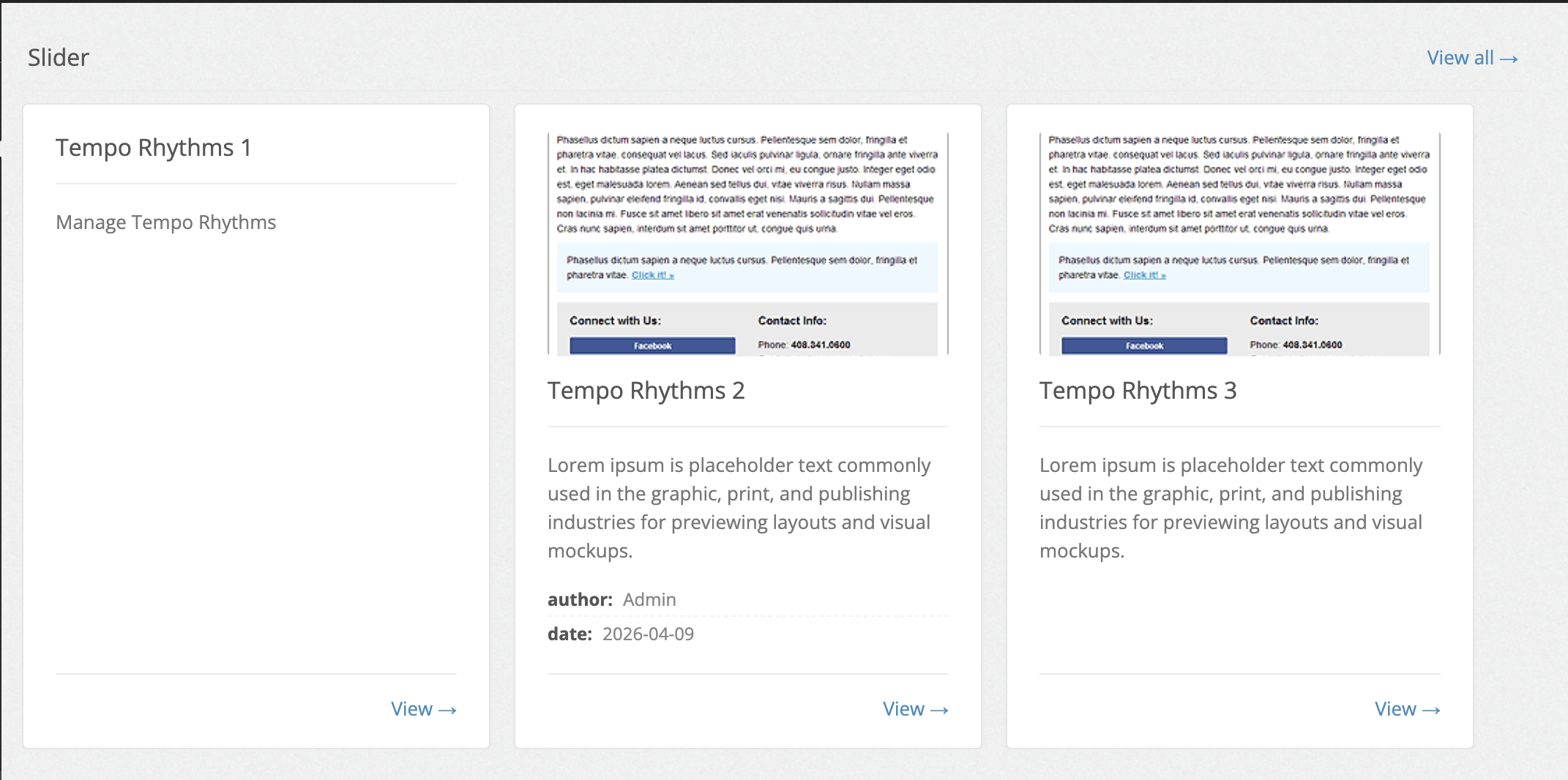
Slider
Component for displaying a horizontal slider/carousel of items with optional caption and "View all" link.
Each item is automatically wrapped in a e-slider-item box defined in the slider template.
Any IUIElement can be passed as a slider item (e.g. card(), message(), widget()).
Methods:
Sets the caption text displayed in the slider header
public function setCaption(string $caption): ISlider;Sets the array of IUIElement items to be displayed in the slider. Throws InvalidArgumentException if any element does not implement IUIElement
public function setItems(array $items): ISlider;Appends a single IUIElement to the slider
public function addItem(IUIElement $item): ISlider;Sets the URL for the "View all" link displayed in the slider header
public function setHref(string $href): ISlider;Sets a custom caption for the "View all" link (default: ISlider::DEFAULT_HREF_CAPTION)
public function setHrefCaption(string $caption): ISlider;Sets a custom message shown when the slider has no items (default: ISlider::DEFAULT_EMPTY_ITEMS_TEXT)
public function setEmptyItemsText(string $text): ISlider;Hides the empty state message entirely when there are no items
public function hideEmptyItemsText(): ISlider;Example:
$slider = $this->ui->slider()
    ->setCaption('Recent posts')
    ->setHref('/posts')
    ->setHrefCaption('See all')
    ->setID('my-slider')
    ->setDataAttributes(['module' => 'slider']);

$slider->addItem(
    $this->ui->card()->setCaption('First item')->setInfo('First description')
);
$slider->addItem(
    $this->ui->card()->setCaption('Second item')->setInfo('Second description')
);

echo $slider->fetch();
Empty state:
// Custom message
$this->ui->slider()
    ->setItems([])
    ->setEmptyItemsText('No posts yet')
    ->fetch();

// Hide empty state completely
$this->ui->slider()
    ->setItems([])
    ->hideEmptyItemsText()
    ->fetch();
Form Components
Input
Basic input field component with extensive customization options.
Methods:
Sets the name attribute of the input field
public function setName(string $name): self;Gets the current name of the input field
public function getName(): string;Sets the label text for the input field
public function setCaption(string $caption): self;Gets the current label text
public function getCaption(): ?string;Sets placeholder text shown when the input is empty
public function setPlaceholder(string $placeholder): self;Gets the current placeholder text
public function getPlaceholder(): ?string;Sets the input type (see Available Types below)
public function setType(string $type): self;Gets the current input type
public function getType(): ?string;Sets the input value
public function setValue($value): self;Gets the current input value
public function getValue();Sets whether the input is required
public function setRequired(bool $isRequired): self;Gets whether the input is required
public function isRequired(): bool;Gets the formatted display value of the input
public function getDisplayValue(): mixed;Sets a disclaimer note displayed below the input field
public function setDisclaimer(string $disclaimer): self;Gets the current disclaimer text
public function getDisclaimer(): ?string;Available Types:
IInput::TYPE_TEXT: Text inputIInput::TYPE_NUMBER: Number inputIInput::TYPE_TEXTAREA: Textarea inputIInput::TYPE_MONTH: Month pickerIInput::TYPE_DATE: Date pickerIInput::TYPE_SELECT: Select dropdownIInput::TYPE_CHECKBOX: Checkbox inputIInput::TYPE_HIDDEN: Hidden input
Select
Dropdown select component with support for multiple selection.
Methods:
Sets the available options for selection
public function setOptions(array $options): self;Gets the current options array
public function getOptions(): array;Enables or disables multiple selection
public function setMultiple(bool $isMultiple): self;Checks if multiple selection is enabled
public function isMultiple(): bool;Shows or hides the empty option at the top of the list
public function setShowEmpty(bool $showEmpty): self;Checks if empty option is shown
public function isShowEmpty(): bool;Gets the formatted display value of selected option(s)
public function getDisplayValue(): mixed;Checkbox
Single checkbox input component.
Methods:
Sets the checked state of the checkbox
public function setChecked(bool $isChecked): self;Gets the current checked state
public function isChecked(): bool;Checkboxes
Component for grouping multiple checkboxes.
Methods:
Adds a checkbox input to the group
public function addCheckbox(ICheckbox $input): self;Gets all checkboxes in the group
public function getCheckboxes(): array;Textarea
Text area input component that extends the base Input component.
Methods:
Sets the number of rows for the textarea
public function setRows(int $rows): self;Gets the current number of rows
public function getRows(): int;Example:
$this->ui->textarea()
    ->setName('description')
    ->setValue('Default text')
    ->setRows(5)
    ->fetch();
Filter Panel
Advanced filtering interface with customizable fields and actions.

Methods:
Sets the filter input fields
public function setFields(array $fields): self;Gets the current filter fields
public function getFields(): array;Sets the form action URL
public function setAction(string $action): self;Gets the current form action URL
public function getAction(): string;Example:
$fields = [
    $this->ui->input()->setName('search')->setPlaceholder('Search...'),
    $this->ui->select()->setName('status')->setOptions(['active' => 'Active', 'inactive' => 'Inactive'])
];

$this->ui->filterPanel()
    ->setFields($fields)
    ->setAction('/filter')
    ->fetch();
Layout Components
Block
Container component for structuring content with a title.
Methods:
Sets the title of the block
public function setTitle(string $title): IBlock;Sets the main content of the block
public function setContent(string $content): IBlock;Widget
Component for displaying various types of content within a web page.

Methods:
Sets the widget's title
public function setTitle(string $title): IWidget;Sets the main content of the widget
public function setContent(string $content): IWidget;Sets the toolbar content of the widget
public function setToolbar(string $toolbar): IWidget;Dialog
Modal dialog component with customizable content and fields.

Methods:
Sets the dialog title
public function setTitle(string $title): IDialog;Sets the submit button caption (false to hide)
public function setSubmitCaption(string|bool $caption): IDialog;Sets the main content of the dialog
public function setBody(string $body): IDialog;Sets the form submission URL
public function setUrl(string $url): IDialog;Sets a unique identifier for the dialog
public function setId(string $id): IDialog;Sets the close button caption (false to hide)
public function setCloseCaption(string|bool $caption): IDialog;Sets whether the dialog is initially hidden
public function setHidden(bool $isHidden): IDialog;Adds an input field to the dialog
public function addField(string $name, IInput $field): IDialog;Adds a hidden input field to the dialog
public function addHiddenField(string $key, IInput $field): IDialog;Card
Component for displaying a card with title, info, and optional actions.

Methods:
Sets the card's caption text
public function setCaption(string $caption): ICard;Sets the card's information content
public function setInfo(string $info): ICard;Sets CSS classes for styling the card
public function setCSS(string $css): ICard;Sets the card's title
public function setTitle(string $title): IWidget;Tabs
A Bootstrap tab set. The component renders the list of tabs and one pane for each tab. The id of a pane is <prefix><ident>.
Methods:
Adds a tab
public function addTab(string $ident, ?string $caption = null, ?string $content = null): ITabs;Removes a tab
public function removeTab(string $tabIdent): ITabs;Sets the active tab. The default is the first tab.
public function setActiveTab(?string $tabIdent): ITabs;Sets the prefix of the pane id
public function setTabPrefix(?string $prefix): ITabs;Returns the tabs
public function getTabs(): array;Example:
echo $this->ui->tabs()
    ->setTabPrefix('order-')
    ->addTab('details', __('Details'), $this->fetch('order_details.phtml'))
    ->addTab('history', __('History'), $this->fetch('order_history.phtml'))
    ->setActiveTab('details')
    ->fetch();
Main Navbar
The top navigation bar of a website theme.
Methods:
public function setLogoUrl(string $logo): IMainNavbar;
public function setLogoTitle(string $logoTitle): IMainNavbar;
public function setMainUrl(string $mainUrl): IMainNavbar;
public function setMenuItems(?array $menuItems): IMainNavbar;   // IMenuItem[]
public function setSearchUrl(?string $searchUrl): IMainNavbar;
public function setSearchPlaceholder(?string $searchPlaceholder): IMainNavbar;
Display Components
Message
Component for displaying status messages or alerts.

Methods:
Sets the message type (success, error, warning, info)
public function setType(string $type): IMessage;Sets the message content to be displayed
public function setMessage(string $message): IMessage;Sets the icon to be displayed
public function setShowIcon(bool $isShow = true): IMessage;Sets the icon content
public function setIcon(string $iconName): IMessage;Sets the close button to be displayed
public function setCloseButton(bool $isShowCloseButton): IMessage;echo $ui->message()
->setMessage($errorMessage)
->setType('danger')
->setCloseButton(true)
->setShowIcon(true)
->setIcon('exclamation-triangle')
->fetch();Data List
Component for displaying tabular data with columns and rows.

Methods:
Sets the column definitions for the table
public function setColumns(array $columns): IDataList;Sets the data rows to be displayed
public function setRows(array $rows): IDataList;Filter
DEPRECATED: This component is deprecated. Please use Filter Panel component instead.
Component for creating advanced filtering interfaces.

Methods:
Sets the filter panel title
public function setTitle(string $title): IFilter;Sets the filter fields to be displayed
public function setFields(array $fields): IFilter;Sets CSS classes for styling the filter panel
public function setCSS(string $css): self;Example using the recommended Filter Panel instead:
// Instead of using Filter component:
// $this->ui->filter()...

// Use Filter Panel component:
$fields = [
    $this->ui->input()->setName('search')->setPlaceholder('Search...'),
    $this->ui->select()->setName('status')->setOptions(['active' => 'Active', 'inactive' => 'Inactive'])
];

$this->ui->filterPanel()
    ->setFields($fields)
    ->setAction('/filter')
    ->fetch();
Custom Components
A project or a plugin adds its own component without a UIEngine subclass.
- Make a class that extends
HuiComponent(or an existing component). - Put its template in
templates/ui/of the plugin or of the theme. - Create it through the engine:
$badge = $this->ui->create(BadgeHui::class, 'ui/badge.phtml');

echo $badge->setCaption('New')->fetch();
create() accepts a class that implements IUIElement and throws ThemeException for any other class.
The template is searched in the same directories as for the built-in components.
To give every plugin or the theme an engine with its own methods, override createUIEngine() in the plugin
(DisplayPlugin) or in the theme class (DefaultTheme).