VirtualRoom / WebRTC
VirtualRoom is the ReactJS client of the Festi Chat plugin. It shows one chat room in the browser: text chat, member list, group video call and webinar.
The client uses these technologies:
- React 17 and Create React App (
react-scripts5). socket.io-clientfor the connection to the signalling server.peerjsfor the WebRTC connections between the browsers.zustandfor the state.i18nextfor the translations:en,ru,ukandkk.
Requirements
- Node.js and npm. The repository does not state a Node.js version.
- PHP and the Festi CLI in the
vendordirectory of the Festi project. The build uses thefesti-reactcommand. - A Festi project with the Chat plugin. The plugin gives the room data to the client.
- A signalling server that uses the Socket.IO protocol. The server is not in this repository.
- A PeerJS server.
Location in a Festi project
This repository is the git submodule static/virtualroom of the Chat plugin.
The build scripts use paths relative to this location:
<project>/
├── vendor/festi-team/festi-framework-cli/bin/festi-react
└── plugins/Chat/static/
    ├── virtualroom/          # this repository (source)
    └── festi-virtualroom/    # the build that the Chat plugin loads
The .htaccess file denies web access to the source directory.
Install
The commands on this page were not run for this page.
-
Get the source. Run the command in the directory of the Chat plugin.
git submodule update --init static/virtualroom -
Go to
static/virtualroom. - Copy
.env.exampleto.env. The file setsPUBLIC_URLto/plugins/Chat/static/festi-virtualroom/. - Change
PUBLIC_URLif your project has the Chat plugin at a different URL. -
Install the dependencies.
npm install
Development
Build and deploy the client after each change of a source file:
npm run watchnpm-watch looks at the js, jsx and css files in src. It runs npm run build after each change.
Open the page of a chat room in the Festi project to see the result.
The repository also has the scripts of Create React App for a development server:
npm startHTTPS=true npm startnpm start and npm run dev set REACT_APP_ENV to local.
The client reads its data from window.roomInfo. public/index.html does not set this object.
Production build
npm run buildThe command does these steps:
react-scripts buildwrites the build to thebuilddirectory.- The
postbuildscript runsfesti-react --mode deploy --name festi-virtualroom --path ./. festi-reactcopies the files ofbuild/staticto../festi-virtualroomunder names without the content hash.- The script removes the contents of
../festi-virtualroom/static. - The script copies
build/static/mediato../festi-virtualroom/static/.
Commit the changed files of static/festi-virtualroom in the repository of the Chat plugin.
Use by the Chat plugin
The template templates/room_chat.phtml of the Chat plugin starts the client:
- It writes the room data into
window.roomInfo. - It adds the
<div id="root">element. - It loads
main.css,main.jsandruntime-main.jsfromstatic/festi-virtualroom.
The js_version setting of the Festi project is the v parameter of these URLs.
Increase js_version after a new build to prevent the use of old files from the browser cache.
window.roomInfo
ChatPlugin::fetchRoom() sets the values. See the README of the Chat plugin for the PHP options.
| Key | Description |
|---|---|
chatApiUrl |
The base URL of the chat API. |
roomID |
The ID of the room. |
hostUserID |
The ID of the author of the room. |
userID |
The ID of the current user. The client makes a UUID if the value is 0. |
userName |
The name of the current user. |
isInitiator |
true if the current user is the author of the room. |
type |
The room type: text, group or webinar. |
privacy |
The privacy of the room. |
hasVideoChat |
The room has a video chat. |
isAllowVideoChatInText |
A text room shows the Call button. |
messagesLimit |
The number of messages in one page. |
messageMaxLength |
The maximum length of a message. |
isStaticMembersList |
The client gets the member list from the API. |
iceServers |
The ICE servers for WebRTC. |
signalingServerUrl |
The URL of the signalling server. |
peerServerConfig |
The options of the PeerJS server. |
lang |
The language: en, ru, uk or kk. The default is en. |
timeFormat |
The time format of the messages. The default is HH:mm. |
isMobile |
The request came from a mobile device. |
name |
The name of the room. |
shareUrl, sharedID |
The URL and the ID to share the room. The client uses sharedID as the room ID in API requests. |
lastReadMessageID |
The ID of the last message that the user read. |
preferredCodecs |
The preferred video codecs. The source keeps the value and does not use it. |
audioIndicatorStatus |
Show the audio level indicator. |
autoReconnect |
The automatic reconnect flag. The source keeps the value and does not use it. |
debugEnabled |
Write debug messages to the browser console. |
logEnabled |
The client does not use this value. See Log server. |
logEnv |
The environment name in the log messages if the build does not set REACT_APP_LOGGER_ENV. |
isAnonymous |
The user is not logged in. The client asks for a name. |
isDynamic |
The client sends the name and the avatar of the user to the other users. |
The room type selects the component: text uses TextWrapper, group uses GroupWrapper, webinar uses WebinarWrapper.
Chat API
src/api/index.js sends JSON requests to these paths. Each path is relative to chatApiUrl.
| Path | Method | Function |
|---|---|---|
chats/<room ID>/members/ |
GET |
Get the members of the room. |
chats/<room ID>/messages/ |
GET |
Get messages. Parameters: message_id, newer_message_id or older_message_id. |
chats/<room ID>/messages/create/ |
POST |
Send a message. |
chats/<room ID>/messages/<message ID>/remove/ |
DELETE |
Delete a message. |
chats/<room ID>/messages/<message ID>/read/ |
POST |
Mark a message as read. |
chats/<room ID>/user/<user ID>/ |
GET |
Get the data of a user. |
chats/<room ID>/action/ |
GET |
Write a user action to the log: start-call, end-call, start-stream, end-stream. |
chats/<room ID>/join/ |
POST |
Join the room. |
chats/<room ID>/peer/ |
POST |
Save peer data. |
chats/<room ID>/peers/ |
POST |
Get peer data. |
Log server
src/libs/Logger.js sends a log message only if the build has a logger token.
src/libs/VirtualRoomEngine.js calls it only if logEnabled is true in the settings store.
src/stores/useVirtualRoomSettings.js does not copy logEnabled from window.roomInfo. Thus the client sends no log message.
Set these variables in .env before the build:
| Variable | Description |
|---|---|
REACT_APP_LOGGER_HOST |
The URL of the log server. |
REACT_APP_LOGGER_TOKEN |
The token for the log server. Do not commit it. |
REACT_APP_LOGGER_ENV |
The environment name in the log. The default is logEnv or default. |
Code style
npx prettier --write src/Signalling workflow
The client uses two servers to connect the browsers:
- The signalling server (Socket.IO) knows the users of a room. It sends room events to them.
- The PeerJS server gives a peer ID to each client and helps to open the WebRTC connection.
Group call
The diagram shows the events in src/libs/SignalServerWebSocket.js and src/libs/VirtualRoomEngine.js.
The signalling server is not in this repository. Thus the receiver of call_users is an assumption.
Text messages and other events
The client sends an event to all users of the room with the user_event message of the signalling server.
| Event type | Function |
|---|---|
message |
A user sent a text message. |
delete_message |
A user deleted a text message. |
update_media_status |
A user changed the microphone, camera or screen status. |
user_details |
An anonymous or dynamic user sent a name and an avatar. |
call_me |
The speaker of a webinar started the stream. Each listener then calls the speaker. |
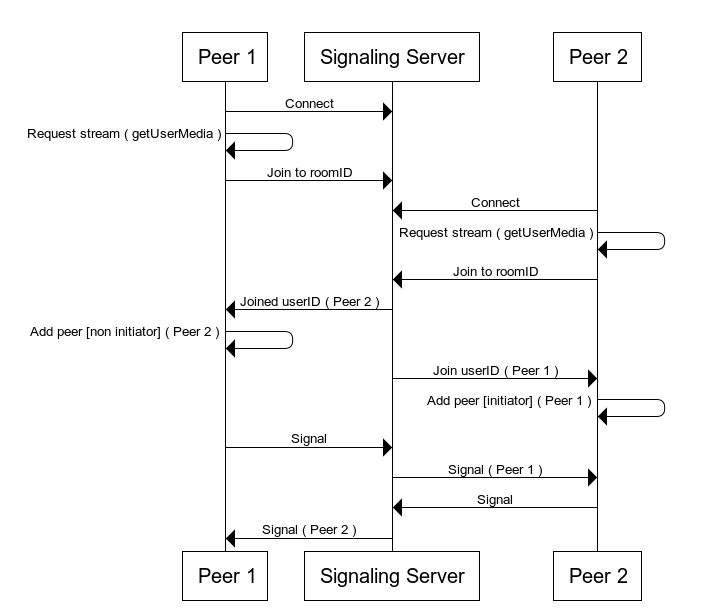
First design
The diagram below is the first design of the workflow.
In this design, the signalling server transmits the WebRTC Signal messages between the peers.
The source now uses the PeerJS server for this step.